Showing posts with label SOFTWARES - TWEAKERS. Show all posts

Tuesday, August 17, 2010

GADWIN PRINT SCREEN

Capture the screen easily!

Screen capture software

What is Gadwin PrintScreen?

Who needs Gadwin PrintScreen?

Why Gadwin PrintScreen?


What is Gadwin PrintScreen?

Want to create a screenshot suitable for saving or printing? Then just hit a key on your keyboard. Oh yeah, you'll have to download this program first.

There are several hotkey combos to choose from (PrintScreen is the default). Once you've chosen your favorite combo, head to the Destination tab and have the screen print out instantly, copy the capture to the clipboard, save it to a specific folder, or even send it through e-mail. You can perform full screen captures, or only capture a specific window.

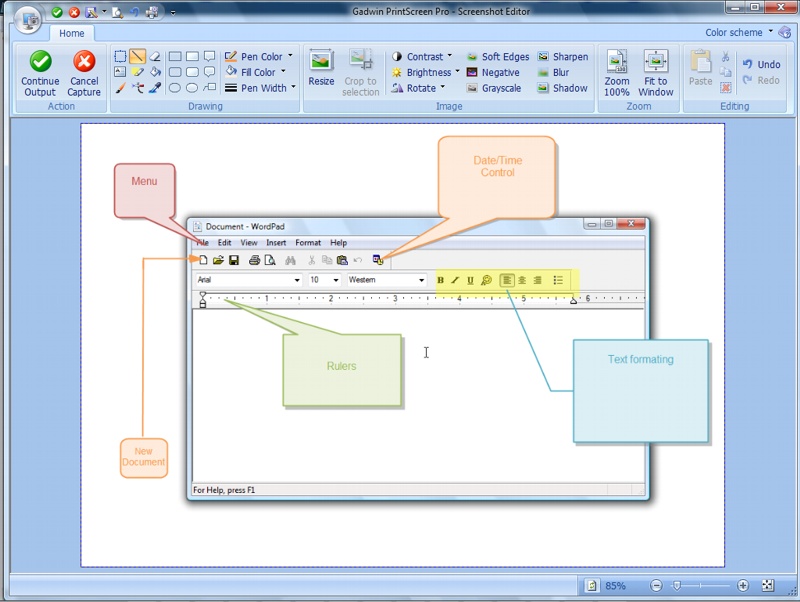
Gadwin PrintScreen is an easy to use freeware utility that allows you to capture any portion of the screen, save it to a file, copy it to Windows clipboard, print it or e-mail it to a recipient of your choice.

There are also six different image formats to choose from, and each one can be resized. With all the customization capabilities, what more could you ask for?

Gadwin PrintScreen Professional combines the power of a first-class screen capture application with an advanced image editing and annotation utility - wrapped into one easy-to-use tool. Gadwin PrintScreen Professional is versatile and extremely easy-to-use.

Who needs Gadwin PrintScreen?

Screen captures can be used for many reasons. Use captured images from Gadwin PrintScreen to show off your product on the web. Enhance technical or sales documents and embed captures into presentations. Gadwin PrintScreen can help you capture and print or save computer screen data.

Why Gadwin PrintScreen?

On most Windows computers a full screen of data can be put on the clipboard by pressing the PrintScreen key. This sends whatever you see on screen to the clipboard, which you must then edit in a different graphics program to cut to the right size and image format. Here are some other reasons not to use the prefabricated PrintScreen function of Windows:

Full screen of data can be put only on the clipboard.

It is either difficult or impossible to capture some elements of a Windows screen, such as different shaped cursors.

You spend too much time making image captures.

Use Gadwin PrintScreen to save time and enhance your screen shots! Download Gadwin PrintScreen now and try it out! This is the best way to learn what it can do.

System Requirement.

Gadwin PrintScreen requires Microsoft ® Windows 98/Me/2000/2003/XP/Vista, or Windows NT 4.0SP6. If you are running any of these operating systems and have a Windows-compatible mouse or pointing device, your system has already met all the requirements necessary to run Gadwin PrintScreen. A full installation of Gadwin PrintScreen requires 5 megabyte of hard drive space.

http://www.gadwin.com/printscreen/


Your's friendly,
[MOHANRAM.G],
ADMIN...

C-CLEANER-THE TEMP FILE CLEANER

Optimization and Cleaning

CCleanerCCleaner is the number-one tool for cleaning your Windows PC. It protects your privacy online and makes your computer faster and more secure. Easy to use and a small, fast download.


Features

CCleaner is our system optimization, privacy and cleaning tool. It removes unused files from your system - allowing Windows to run faster and freeing up valuable hard disk space. It also cleans traces of your online activities such as your Internet history. Additionally it contains a fully featured registry cleaner. But the best part is that it's fast (normally taking less than a second to run) and contains NO Spyware or Adware!

Cleans the following:

Internet Explorer
Temporary files, history, cookies, Autocomplete form history, index.dat.
Firefox
Temporary files, history, cookies, download history, form history.
Google Chrome
Temporary files, history, cookies, download history, form history.
Opera
Temporary files, history, cookies.
Safari
Temporary files, history, cookies, form history.
Windows
Recycle Bin, Recent Documents, Temporary files and Log files.
Registry Cleaner
Advanced features to remove unused and old entries, including File Extensions, ActiveX Controls, ClassIDs, ProgIDs, Uninstallers, Shared DLLs, Fonts, Help Files, Application Paths, Icons, Invalid Shortcuts and more... also comes with a comprehensive backup feature.
Third-party applications
Removes temp files and recent file lists (MRUs) from many apps including Media Player, eMule, Google Toolbar, Netscape, Microsoft Office, Nero, Adobe Acrobat, WinRAR, WinAce, WinZip and many more...
100% Spyware FREE
This software does NOT contain any Spyware, Adware or Viruses.


CHECK OUT THE FOLLOWING WEBSITE FOR MORE DETAILS

http://www.piriform.com/ccleaner


Your's friendly,
[MOHANRAM.G],
ADMIN...